Windows XP Intro
|
|
|---|---|
 |
I have been beta testing Windows XP for almost 2 months now, way back when it was refered to as Microsoft Codename: Whistler Beta 2 Build 2464. This site will tell you the good, the bad, and the ugly about the misterious Windows XP operating system. It is just a beutiful operating system, i would make love with it, but that would be simi-imposible.(Not to mention that Chris would never hang out with me again, and Brandon would be here all the time) The preceding is a rediculisly indepth review on the OS. I think you will find it informitive though. |
Instalation...
|
|
The installation of Whistler was very painless.as a matter of fact, it went threw so smoothly, i was almost expecting it to crash at the final stretch. But, it didn't. For your conveniance, i have a very indebth review of the install. Why am i writing a review of the install? because this is one of the things that i wondered about.
|
|
Pre Install...
|
|
Before you install any operating system, it is advisable to back up all your infomation, and preform a clean install if posible. Since i did a clean install, i backed up 6 CD's (like 4 Gig's) of infomation. To do a backuup well, you should write out a list of all the catigorys you want to back up (think about this one, include address books, AIM/ICQ lists, All you device Drivers and saved games) and follow threw with it. Then, if you want to do a clean install, like i did, go in to dos mode.
|
|
The Install
|
|
These are the steps and the times to preform the install of Codename Whister Beta 2 Build 2642. I am guessing it would take about the same time to Install Windows XP RC1 in the same fasion. |
|
10:52 PM
|
I shutdown Windows 98, and booted in Dos Mode. cried,
and typed in 'Format C:', which is somthing you only type if you want to
delete all the infomation on the hard drive. You must do this to do a
clean install.
|
11:25 PM
|
After the format, I inserted the Whistler Beta CD,
and restarted the computer.
|
11:31 PM
|
Had to do a quick re-format (like only a minute or
so) in the NTFS file system, so i can have a faster system.
|
11:39 PM
|
The system was rebooted and the accual installation
took place.
|
12:08 PM
|
It restarted again and started the OOBE (Out Of Box
Experiance), the thing that you would see if you bought a computer with it
pre-installed.
|
12:10 PM
|
At the desktop, Install Complete. It took 1 Hour, 18
minutes to install. That was 42 minutes earlier than i predicted. Wbich is
pretty fast for format and install. durring the format, i was worried that
i wouldn't make the 2 hour makr i set.
|
OverviewThe Install was unpredictably painless. Now, i would have figured that it would have been a harsh beast i would have to tame, Requiring a lot of useless infomation, becasue it was a beta release. Problems
|
|
The Luna Interface
|
|
Windows XP has somthing for everybody. If your a Windowblind Junkie, you will love the new theming interface. Microsofot threw out the Explorer interface (that buggy thing that made Windows Me Crash all the time, it's what makes the Windows Interface) and started using one called Luna. Luna took 3 years to develop, and it's off the heazy blazin R&B and hip hop. Now, even though it's themeable, there is 'Classic' theme, which is like the Original, Crap windows interface. If you use Windowblinds, you know how slow it makes your computer. This is not the case in XP. you will not notice any diffrence with the themes. I am running it with half the reccemended RAM, and i don't notice any speed decresses from 98. In home eddition, the taskbar is very limited. There is no Quick Launch. The taskbar is as it was in Windows 95. I think they should really fix that. But, if you want to use the Pro eddition, It is as customizable as it was in ME or 98. |
|
The Enhanced Start Menu
|
|
 |
Definatly one of my favorite features of XP is the start Menu. As you can see in the screen shot, it's bigger. it holds more stuff, for example you can put the programs you use offten at the top, it displays 5 of your resently used programs and files at the bottom, it has common folders and tasks on the side. these folders include My My Music at default. I like that Microsoft hooked us up with that. because my My Music folder is huge, it's like 2.1 GB's. and it is thefolder most used on my hard drive. I think this was a huge pull. Since you log in to Windows, it put's your log in name at the top (The Superterran Baby) and it let's you select an image. You can make your own, but i have not built my own yet, So i selected a person praticing Martial Arts. From the looks of his regelia, i would think he is practicing the Korean form of Martial Arts known as Taik Wan Dou. But i am not an expert, so i don't know for sure. Most of the time they do not use Jump Kicks in Taik Wan Dou, so it could be Nin Jiz Sou. It's hard to tell. I am getting off the point. if you deside to update for any one reason, the start menu should be it. it is my favorite feature. Right beside the new interface. |
Windows Explorer (My Computer To The Common Folk)
|
|
 |
Microsoft did a good thing with Windows Explorer. Microsoft, in there infinitve knolage took out all the crap HTML stuff, and replaced it with ultra-fast XML rendered objects. What does that mean? No more slow loading My Computer. It's rendered very fast, i'm inpressed. The way it is set up by defaut is really annoying. If you look at the image i provided on the side, it is very effecient, but immagine at the top of it, it says 'Shared Folders', and shows a list of folders shared on your PC. That is the way it is set up by default, and the only way to change it is to go editing the Registry. Because it annoyed the hell out of it, i cracked Windows open and changed it. I can not immagince anyone wanting that feature, unless they were on a network, And i think that Microsoft could have been smart and made it so it could be toggled on and off. But, other than that complaint, it works really good. Very fast rendering. |
The Control Panel
|
|
 |
I had mixed feelings about the new Control Pannel the first few times i tried it. The first few times i was like 'Where the hell is it?', because the catigorys are very broad. But, after the 3'rd of 4'th time using it, It grows on you. Now, if you don't know what your doing in windows, it's a GOD SEND. you will love the new control panel. why? The new control Pannel is task oriented. For example, if you want to change your background. Under Catagorys, click Apperance and Themes, then it will ask you what you want to do. Just Click 'Change My Wallpaper'. How easy is that? Now, most powerusesr will be annoyed at the ease of use the first time you use it. But, it really grows on you. trust me, i hated the bloddy thing my first go at it. But, now i love it! |
Windows Messanger
|
|
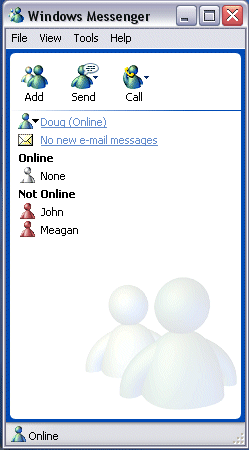 |
Windows Messanger is your .NET portal for Windows XP. I'm sure it's destened to be the next Anti-Trust law suit. But, in reality, it's a pretty good program. I am finding out how many of my friends are accually using it. it's kinda wild. It's a very good program. I'd recemend using it to all the XP people. I like it a bunch more than AIM. As you can see, it checks you Hotmail, lets you talk to people, via the MSN messanger service, and will hook you up With Microsoft Passport accsess to all Microsoft Websites. I have been impressed with it so far. I am getting all my friends to use it. |
Windows Media Player XP
|
|
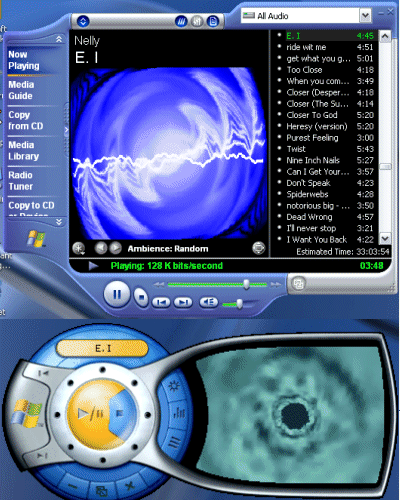 |
Now. Before i used this product i hated Windows Media Player 7. Hated it. But, i really like WMP-XP. It's a hott app. I have some problems with it, It won't let you wipe out your MP3 Database, and refresh it, but it's still not a bad program. The visualizations work a lot faster than they did in WMP7. And i am really feeling the new interface. it has 3 diffrent modes, Full Mode, which is a window Mode, I guess Mid Mode, which is the same thing, exept it's freeform, and The Mini-form, which is the small one. I am replacing Win-Amp with this. I swear, Microsoft is accually inavating. it's really, really scrary. I am proud of this product. It is integrated in the My Music folder, which is really cool, and it handles a large collection of MP3's really well. Like i said earlier, the Visualizations are really good. And it's movie support is really good! It plays off as a good looking DVD player, if you want to use it for that. I am very impressed with it so far. and it seems to do good on the resourses end. |
The Final Thought...
|
|
I love this Operating system. I think that RC1 should just be released as is, becuase it seems complete to me. I think i will use it for a long time. There is a review at the bottom of this page, but it was writen before i installed it. it's pretty accurate though. I hope this review has helped you out. |
|
Windows XP Review
|
|
Microsoft Windows XP is the newest version of Microsoft Windows. This release will sport new user interface, named Luna. XP is based on the Windows 2000 Kernal, which is a very powerful and non-buggy kernal. The new OS is very 'task oriented'. What the hell is that you ask? When they start advertizing it, thats what you will hear. "It's so task oriented!". What task oriented means is instead of it listing options upon options, it runs a wizard like task. for example, when you want to change your display properties, instead of a window poping up, giving you a list of avalible options, Windows will ask you "What would you like to do..." and give you a couple of options. when you select one option, it will give you more, pin pointing what you want to do, helping novices configure there UI to there liking. That simple technology can be addapted to most of the ways users use there computers, making XP better for novices. Other inportant updates is the Start Menu. The start menu has been redesigned, to be more efficent. There are many new features with Windows XP. The least known is it's updated hardware support. In XP profesional eddition, It will be able to support duel prossessors. Now most of you people are probably thinking one of two things. Either 'Yeah, and?' or 'Windows ME didn't do that?'. Let's start with the first question first. If you have an AMD Athlon Prossessor at 2 GHz, and you have a slot for another prossessor, then when the standard is like 4Ghz, you can add another 2Ghz for like 1/8'th the price. Smart eh? Now, it's a common misconseption that having duel prossessor's will take 2 2GHz prossessors and making your computer run at 4Ghz. well, Not really. If your multi-tasking, for example, if your running MS Word and Internet explorer, it will run one program on Prossessor 1, and another on prossessor 2. Now, what if your running one program? thats imposible. Window's it's self will take up mad prossessor cycles. Now, add your anti-virus program, fire wall, Win Amp, Windows Explorer (Or in XP, Windows Luna) Your resorces are gonna be pretty low. So, if you divide those program's up between two prossessors, then you're gonna double your resorces. Ahhh, sounds good. and for the second question, No, windows 98 did not support dual prossessors. but, Windows 2000 and NT 5 did. Also, Windows XP Pro will suport a gig of ram, where windows 98 only suport 512MB. And, since ram's like dirt cheap now (80 bucks for like 256MB) it's a good idea just to get some bloody ram. The most publised update in XP is the Luna interface. Wow, it is a hott. Microsoft pretty much pulled a Windowblinds on us here. The Luna interface is 100% skinable, meaning you can make it look any way you want. There is some good news and bad news. The bad, Microsoft is not writing a program to let you change or create themes for it. the good? After stardock wrote Windowsblinds XP, Microsoft said Hey, why don't you do it for us. So, we don't have to deal with Microsoft's half baked crashy butt software for a change. Now, most of the time i'm not feeling Windowblinds. It kill's your computer resorces in previous Window's releces, but since luna is designed for skinning, There should be no resorce drain at all. pretty cool. Window's has already released 3 skins. The Explorer skin, The Luna (default) skin, and the Grey luna skin (it's blazin' R&B & Hip-hop Off the heazy Jenifer lopez hott.) Since Luna is re-writen from the ground up expect it to be less buggy. And, the word on the street is Microsoft is throwing away the slow, buggy HTML Window explorer mode (you know, View as a webpage) and going ahead and using ultra fast and stable XML rendering (Like the stuff Winamp 3's playlist rendering software is based on) so expect it to have a little speed improvements. All the default Window's programs have also had a face lift. Internet Exporer 6 looks really cool in XP, although it looks the same in any other Window's releace. This goes the same for Office XP and any other microsoft program with XP as the last thing in the title. Well Doug, my computer's kinda slow. Should I Update? Well, i wish i could deliver better news to you, but your answer is probably gonna be no. Microsoft says it works best as a OOBE (Out of box experiance) but if you plan to update, It's reccemended system requirments are a Intel Pentium 2 or equivelent at 500Mhz or better. They want you to at least have 128Meg's of ram. A video card that can support at least 16 Bit colors, at least 3GB of free space, with a resolution of at least 800 by 600. Now, I'm thinking the system requirements are like 300Mhz Intel pentium or equivelent (That mean's any 300 MHz or above prossessor works) with 64 meg's or ram, a video card with at least 256 Colors, and 1GB of free space. Now why are these requrirements so extencive? Windows 98 only needed 64 Meg's of ram, and a 90 Pentium with 16 Meg's of ram. Your answer, diffrent kernal. Like Windows Me was so slow because of all the HTML add on's, but XP is not using the menphis kernal (Window's 98's code name was Menphis) it's using the Windows 2K kernal. And 2K has some pretty heafty requirments, but it run's beutifly. How do i know? How many times you go to your favorte website? How many times does it now work? if your answer is never, then it's probably running on Windows 2K. Since 2K run's website's, it has to be stable. So, your not going to get all the crashes you get in ME. Well, i've heard rumer's that XP's gonna bring the end of the internet. What's up with that? Well, if you never heard this rummer your probably like 'oh come on.' accually they had a debate on this very topic on Silicon Spin a while ago. This is really blown out of proportion. What it's about is somthing called a Raw Socket. Window's XP will support this feature. what some people are saying is that script kiddies (newbie hackers) will use this to there advantage, because they can overload servers, causing them to send out DDOS's (Directed Denial of service) to people trying to accsess the page. This used to be only a feature of Unix based systems. People are saying that script kiddies will figure out how to do this, and bring corperate website's to their knees. they're also saying that previous version's of window's could not do this with out a 3'rd party driver which most Script kiddies just didn't have the know how to install. This is kinda distorted. First, previous version's of windows did support this. only in consumer version's of windows (ME,98,SE,95,3.1) didn't have the ability to use Raw socket's with out a 3'rd party driver. But, All corperate version's of windows (2K, and NT's) could. and since XP is using the 2K kernal, it will be able to, too. Well, they are blowing this out of porportion because the 3'rd party driver's are very easy to install. So, your gonna see a little increase in DDOS attacks. and since XP will have an integrated Firewall, it could be harder for a hacker to start a multicomputer DDOS attack (The most effective kind). So, what is a raw socket? a raw socket is a port of windows that can send trash data to a remote computer on command, so, if you want to pull a DDOS on a computer, you can open up the raw socket, and start pinging the hell out of a server. This is best effective when it's comming in conjunction of other computers. Ussualy a hacker will hack in to many computers and get them to start pinging the server at the same time. And a server can't handle that. Well, what is a ping, and why do they even let user do that. Ping is not attended to be a bad thing. A Ping is sending trash data to a server (ussually like a couple hundred bytes) and waiting for a responce. When you resive a responce, it will tell you how close you are to that computer, by giving you a ping time (how fast the infomation was returned in Miliseconds), well, that's what a socket does. in raw sockets, it just send's trash infomation, dosn't need a responce. it could kill a system. So, what do i think of it? I plan on updating. And i hope you do too. It's gonna be a great OS. It has some security vonrebilitys, but alot less than Me. The skins are gonna be a great feature, and you can do alot of stuff with it. |
|